Merb's router supports a nice redirect feature:
r.match('/old-invalid-url').redirect("/hawt-new-goodness")
One item of note--this redirect defaults to a 301 status, so if you're playing around with this and want 302's instead, pass a false as a second parameter to redirect:
r.match('/').redirect("/login", false)
If you happen to confuse this and set a permanent 301, just add in the false, hit the page again, let the 302 be processed, and you should be good after taking out the redirect again.
Saturday, September 6, 2008


Thursday, September 4, 2008
A script to help with Rails -> Merb conversions
People have asked often in #merb for something to help with converting Rails apps to Merb apps. There's no magic Wizard to do this for you, but hopefully this will help:
http://github.com/jackdempsey/find_rails/tree/master
Its a standalone Thor script that looks in your current directory (or a provided path to an app), finds the app/ directory, and scans through the code for a variety of things that people get tripped up on in Merb. I imagine this list will increase over time, but it will help with some of the obvious ones to start.
This is very much a work in progress. Running it standalone like this, especially given the way I've organized it, loses some of the flexibility Thor provides. It also makes it easier on the user to invoke. I imagine if this is used by people and grows to be anything bigger than a simple helper script, I'll refactor the way the task is started, so I'd recommend cloning this and playing with the source a bit as well.
Anyway, if you haven't played with Thor yet, you should give it a go. Its fast, flexible, and a great way to avoid the "fun" of parsing options yourself.
Currently there's a bit of an issue with installing tasks that have multilevel namespaces. For the time being, I've committed a fix to the constants branch of my fork at http://github.com/jackdempsey/thor/tree/constants
I foresee this fix getting cleaned up and merged into the main Thor repo soon. In the meantime, if you're looking at using Thor with tasks like foo:bar:baz, this fork will fix things up for you.
Update
I fixed things up a bit so that we can search on regex's as well. This came out of a discussion in #merb re: the tendency to "redirect && return" in Rails, which is the reverse of what you'll want to do in Merb.
http://github.com/jackdempsey/find_rails/commit/ea80df077c8cee0959ce1e7b4b17321924f19dc7
http://github.com/jackdempsey/find_rails/tree/master
Its a standalone Thor script that looks in your current directory (or a provided path to an app), finds the app/ directory, and scans through the code for a variety of things that people get tripped up on in Merb. I imagine this list will increase over time, but it will help with some of the obvious ones to start.
This is very much a work in progress. Running it standalone like this, especially given the way I've organized it, loses some of the flexibility Thor provides. It also makes it easier on the user to invoke. I imagine if this is used by people and grows to be anything bigger than a simple helper script, I'll refactor the way the task is started, so I'd recommend cloning this and playing with the source a bit as well.
Anyway, if you haven't played with Thor yet, you should give it a go. Its fast, flexible, and a great way to avoid the "fun" of parsing options yourself.
Currently there's a bit of an issue with installing tasks that have multilevel namespaces. For the time being, I've committed a fix to the constants branch of my fork at http://github.com/jackdempsey/thor/tree/constants
I foresee this fix getting cleaned up and merged into the main Thor repo soon. In the meantime, if you're looking at using Thor with tasks like foo:bar:baz, this fork will fix things up for you.
Update
I fixed things up a bit so that we can search on regex's as well. This came out of a discussion in #merb re: the tendency to "redirect && return" in Rails, which is the reverse of what you'll want to do in Merb.
http://github.com/jackdempsey/find_rails/commit/ea80df077c8cee0959ce1e7b4b17321924f19dc7
Saturday, August 30, 2008
Experimenting with Ubiquity
For those of you who know what Ubiquity is, I'll keep this brief. For the non-initiated, take a second to read about what many describe as Quicksilver for Firefox: http://labs.mozilla.com/2008/08/introducing-ubiquity/
You can install it here, read the tutorial and then come back when up to speed.
Cool stuff, right? So I took a look at their wiki earlier and was kind of surprised to find that nothing was listed there for Ruby...but you could search for php functions? Blasphemy...so I took their code and hacked it up a bit:
Easiest way to play with this in my opinion is, once you've installed Ubiquity, test it at chrome://ubiquity/content/editor.html
As you can see from the gist, its pretty easy to create a new command to play with and you can easily add in search capability for your favorite site. If its well known there's a shot someone's done that already.
Anyway, I thought this was pretty cool and imagine over time it will enable some pretty interesting mashups. Its almost a more powerful and approachable version of Yahoo Pipes, albeit a different sort of beast.
As I get time I'll be playing more with it, probably hooking up some nice Merb search capabilities. Feel free to drop some comments if you have some ideas, but perhaps aren't familiar with Javascript or coding in general. Enjoy!
You can install it here, read the tutorial and then come back when up to speed.
Cool stuff, right? So I took a look at their wiki earlier and was kind of surprised to find that nothing was listed there for Ruby...but you could search for php functions? Blasphemy...so I took their code and hacked it up a bit:
Easiest way to play with this in my opinion is, once you've installed Ubiquity, test it at chrome://ubiquity/content/editor.html
As you can see from the gist, its pretty easy to create a new command to play with and you can easily add in search capability for your favorite site. If its well known there's a shot someone's done that already.
Anyway, I thought this was pretty cool and imagine over time it will enable some pretty interesting mashups. Its almost a more powerful and approachable version of Yahoo Pipes, albeit a different sort of beast.
As I get time I'll be playing more with it, probably hooking up some nice Merb search capabilities. Feel free to drop some comments if you have some ideas, but perhaps aren't familiar with Javascript or coding in general. Enjoy!
Monday, August 18, 2008
Updated merb-thor tasks
Lots of questions have come up regarding sake in #merb recently. The current sake tasks at merbivore.com are out of date, so I updated the tasks inside merb-more itself. You can install using:
For those interested in Thor, I've also updated the tasks at:
They, like the sake tasks, are particular about directory structure, so make sure you've set things up, and run things from the correct directory.
http://github.com/jackdempsey/dm-thor/tree/master |
For those interested in Thor, I've also updated the tasks at:
http://github.com/jackdempsey/merb-thor/tree/master |
They, like the sake tasks, are particular about directory structure, so make sure you've set things up, and run things from the correct directory.
Wednesday, August 6, 2008
A Mac zoom key
I'm a bit picky when it comes to how I interact with my system; I have tons of aliases, shortcuts, quicksilver triggers, pretty much anything that will save me typing. One that I use every day is a trigger for Zoom.
Open up System Preferences and click on Keyboard & Mouse. Select the Keyboard Shortcuts tab, and click on the plus at the left to add a new one. You'll want to type in Zoom and whatever key combo you wish--I like shift-cmd-M.
Should look something like this:
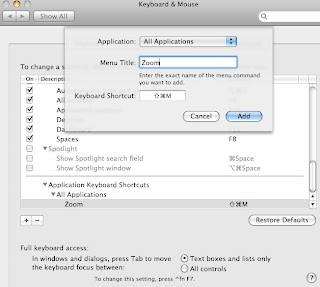
Save that and open a new terminal window and give it a go. It will of course work in whatever app you can zoom in, I just find I use it in terminal and sometimes my browser almost all the time.
Enjoy!
Open up System Preferences and click on Keyboard & Mouse. Select the Keyboard Shortcuts tab, and click on the plus at the left to add a new one. You'll want to type in Zoom and whatever key combo you wish--I like shift-cmd-M.
Should look something like this:

Save that and open a new terminal window and give it a go. It will of course work in whatever app you can zoom in, I just find I use it in terminal and sometimes my browser almost all the time.
Enjoy!
Monday, August 4, 2008
merb-dev sake tasks update
People mentioned today that the sake tasks were broken, so as of commit 123f1e13e96ba6d42cbb0d25554913ab9851cd6a in merb-more you should be good. I changed the installation of primarily the extlib library, and reordered things a bit. As Yehuda mentioned recently, when living on the edge things can be a bit unstable. The pain this may create now is a small price to pay for a 1.0 release thats solid and easily used by many, so please stay tuned and keep the comments coming in #merb.
Sunday, August 3, 2008
a quick note on deploying with git
I've deployed a merb app and rails app recently with git, both on slicehost.com boxes. For one I didn't need this option, and yet for the other I did...so, to anyone having issues with git deployment with capistrano, see if this helps. In your deploy.rb file add this line:
default_run_options[:pty] = true
The guys at github.com mention this in their guide to deploying with capistrano as well, so if you need other clues I suggest checking that out.
default_run_options[:pty] = true
The guys at github.com mention this in their guide to deploying with capistrano as well, so if you need other clues I suggest checking that out.
Subscribe to:
Posts (Atom)


 Posts
Posts

